
◷
Hours & attendance
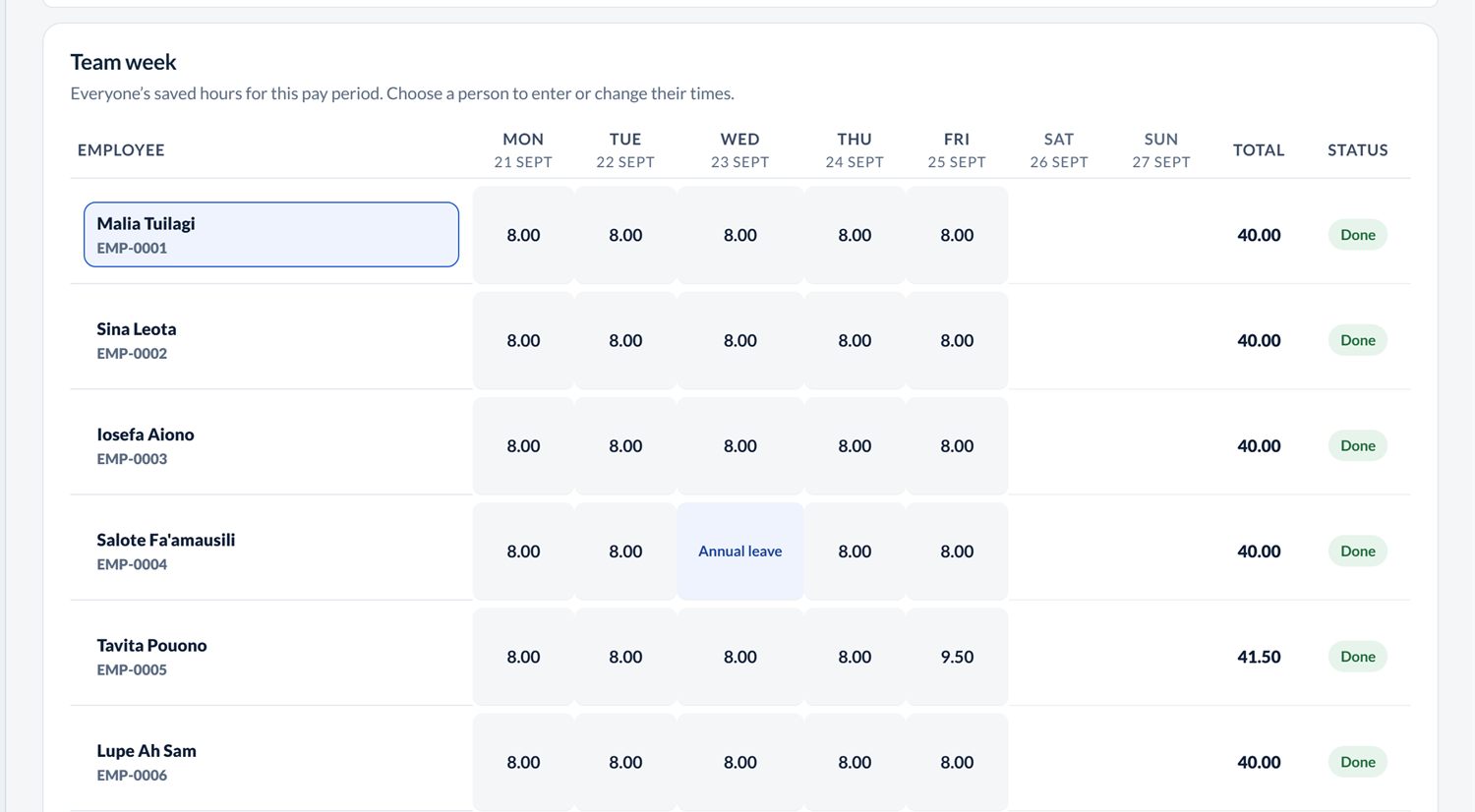
See the whole team’s week at once. Overtime, sick leave, annual leave and public holidays are all paid correctly.

Payroll software for businesses in Samoa
Put in the week’s hours and Connect Payroll does the rest: PAYE, NPF and ACC, payslips, the bank list, and your P4 at the end of the month. Most weeks you’re done in a few minutes.
Already paying their staff with Connect Payroll
 Connect IT
 Elite Auto Detailing
 Holiday Homes Samoa
 EMG Services
Aso totogi · How a pay week goes
Here’s a normal pay week, start to finish. The screens are the real app, with sample staff.
01 Monday · 7:30am
Put in each person’s pay rate, how often they’re paid, and whether it goes to the bank or in cash. Bus fares, allowances, social fund and loan repayments only need entering once. After that they come through every payday on their own.

02 Friday · 5:00pm
Type start and finish times, or copy a normal day across the week. Overtime, sick days, annual leave and public holidays are paid at the right rates. You don’t need a time clock, but if you have one, the timesheet and clock import add-on reads its exports.
03 Monday · 9:00am
PAYE comes straight from Revenue’s weekly, fortnightly and monthly tables. NPF is 10% from the worker and 10% from you, and ACC is 1%. If something looks wrong, like missing hours or deductions that are too high, you’ll see it before you approve.
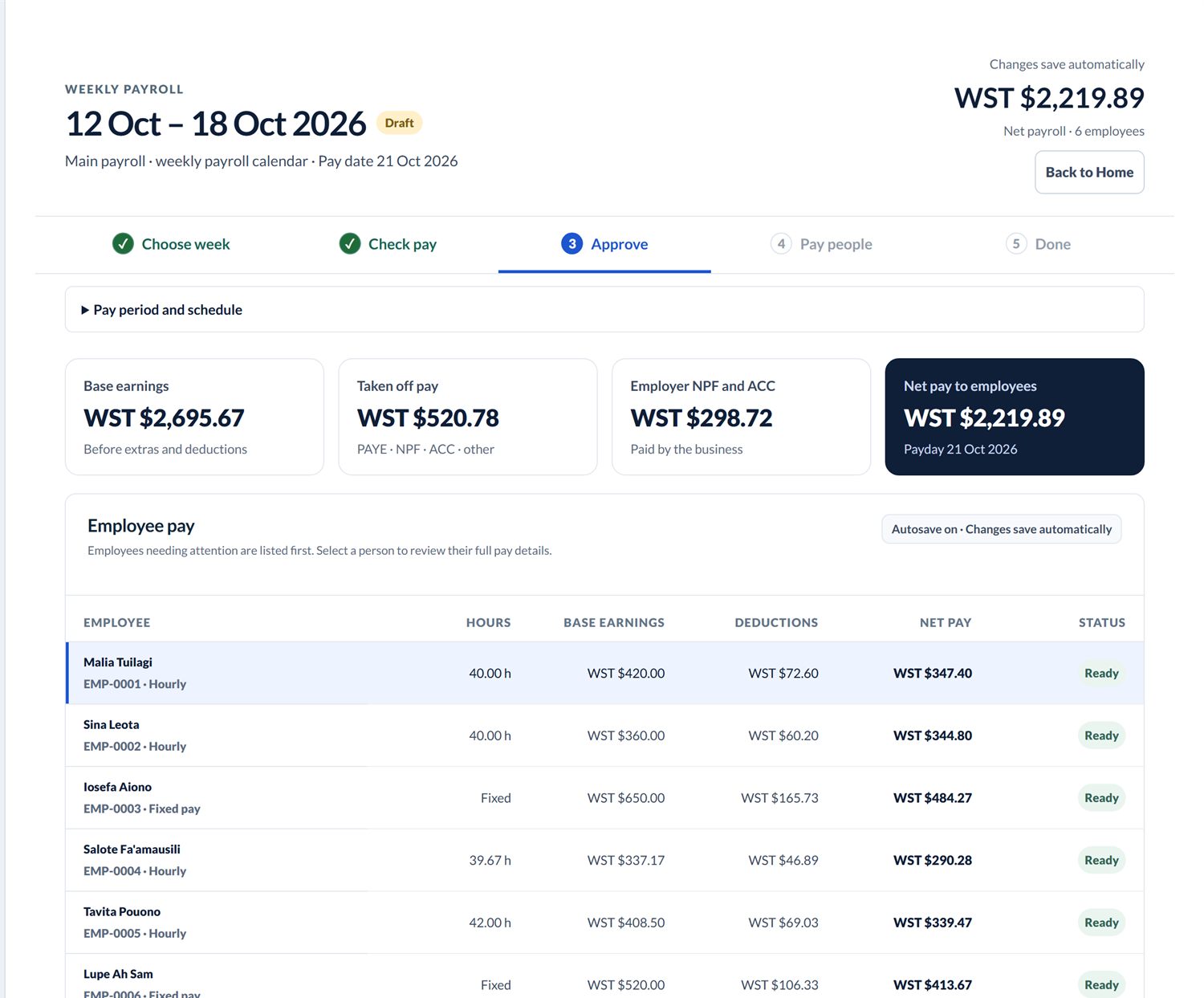
04 Wednesday · Aso Totogi
Approve the pay run, then print or email the payslips and take the bank list to your bank. If you pay in cash, the cash sheet tells you which notes and coins go in each envelope, rounded up to the next 10 sene.

05 · Month end
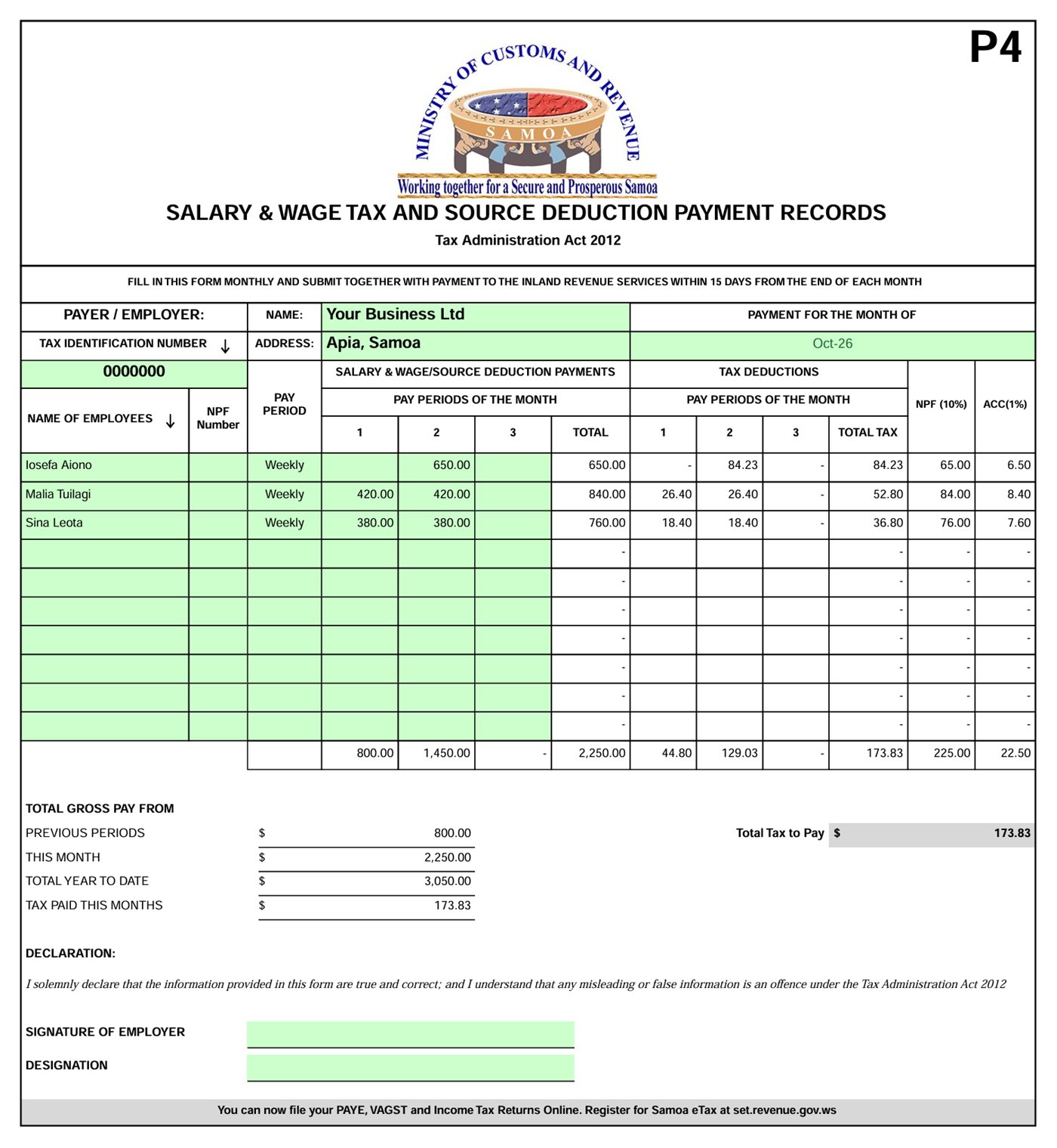
Choose the month and Connect Payroll adds up every pay run for you. This is the actual P4 it prints, laid out like Revenue’s form, so all you do is check it and sign. Your SNPF schedule is ready too, with the full 20% for each person.
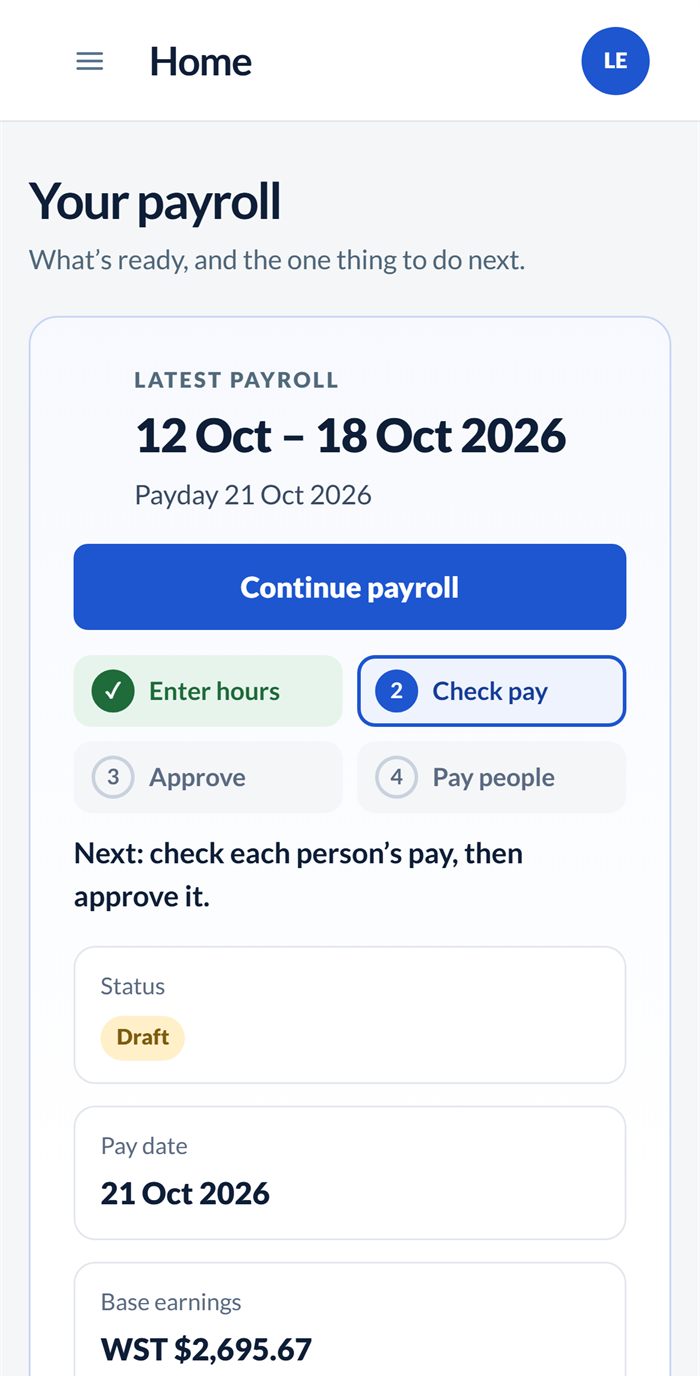
06 · Anywhere
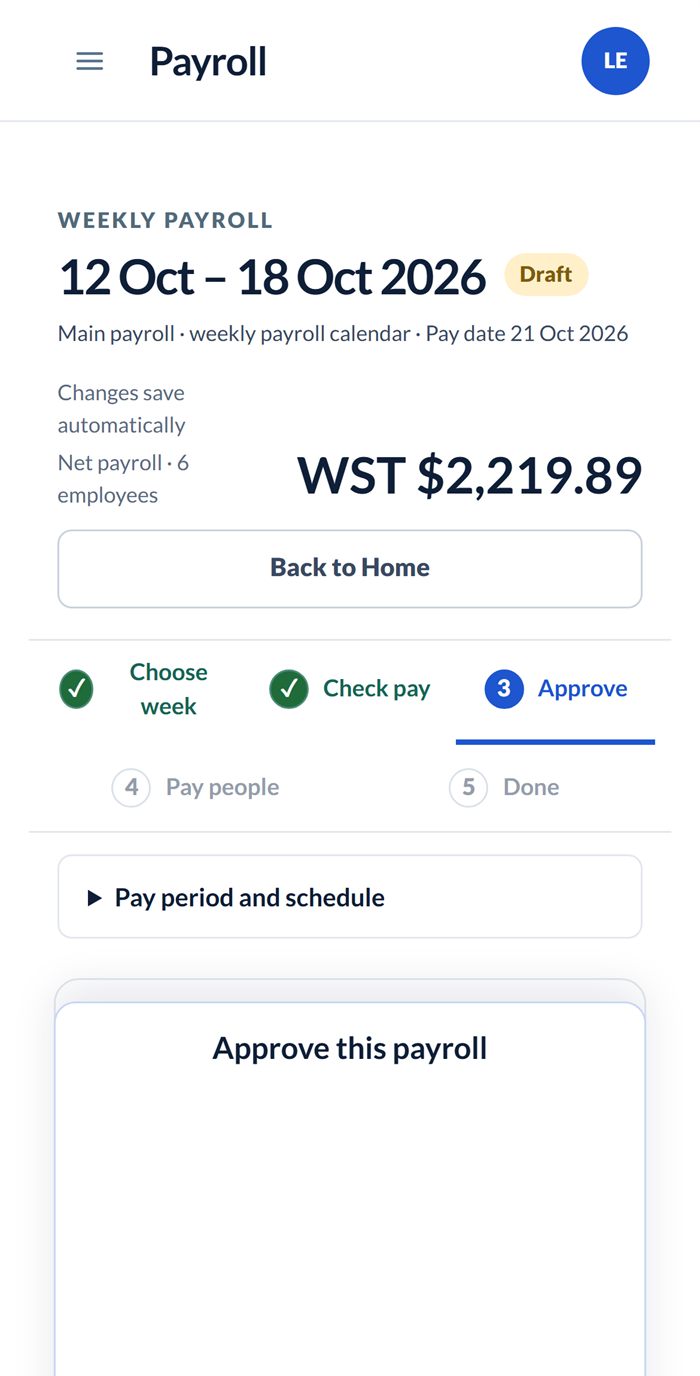
At the shop, on the ferry to Savai’i, or at home after lotu. It works in your phone’s web browser, so there’s nothing to download.
What’s included
No more rebuilding the spreadsheet every week or double-checking someone else’s formulas.
See the whole team’s week at once. Overtime, sick leave, annual leave and public holidays are all paid correctly.
Worked out from Revenue’s tables every time, with NPF at 10% + 10% and ACC at 1%.
A clear payslip for each person. Email them, or print two or four on a page.
A bank list for internet banking, and a cash sheet with the exact notes and coins.
Printed in Revenue’s layout, along with your SNPF schedule. Due dates show on your Home screen.
Annual, sick and bereavement leave. Balances build up by themselves every payday.
Set up the repayment once. It comes off each pay until it’s paid back, and shows on the payslip.
Payroll registers and PAYE, NPF and ACC reports for any dates. Every past pay run is kept.
Sign-in by invitation only, bank numbers encrypted, and a record of who approved what.
Who uses it
Whether it’s a family fale’oloa with three staff or a resort with shift workers on Upolu and Savai’i.




Pricing
You pay per business, per month, and only for the staff who are active that month.
Everyday payroll for most businesses.
WST39/month
+ WST 5 per active employee
Minimum WST 69 a month
For bigger teams, or more than one site.
WST59/month
+ WST 7 per active employee
Minimum WST 94 a month
Add-on · for Core or Plus
Upload the timesheets you already have: a spreadsheet, a PDF, a photo of a paper timesheet, or the export from your time clock or rostering app. We read it, you check each day, and only what you approve is saved.
Reads exports from







Don’t see yours? Send us an export and we’ll add it.
What you’d pay each month
| Active staff | Core | Plus |
|---|---|---|
| 5 | WST 69 | WST 94 |
| 10 | WST 89 | WST 129 |
| 20 | WST 139 | WST 199 |
Made in Apia
We built Connect Payroll in Apia, and we use it to pay our own staff. It’s made for the way businesses here pay people, with cash wages, fortnightly PAYE, SNPF and ACC. If you get stuck, give us a call.
Questions
No. If you can fill in a form, you can do payday. Every field has a short explanation, and the Home screen tells you what to do next.
No. You can type the hours in, or copy a normal day. If you already have a time clock, from ZKTeco, Hikvision, Dahua, Uniview, Anviz or another maker, the timesheet and clock import add-on (WST 30 a month) reads its exports. If yours isn’t read straight away, send us an export and we’ll add it at no extra cost.
Yes. PAYE uses Revenue’s weekly, fortnightly and monthly tables. NPF is 10% from the worker and 10% from you, and ACC is 1%.
Yes. The cash sheet shows which notes and coins to count for each person, rounded up to the next 10 sene.
No. You still pay through your bank or in cash, and you hand in the P4 and SNPF schedule yourself. Connect Payroll gets it all ready and printed.
Yes. Call or message us and we’ll walk you through it using your own business.
Manuia le aso totogi
Tell us how you pay your team now, and we’ll show you how it would work in Connect Payroll. It’s free, and there’s no pressure to sign up.
Already a customer? Sign in →